
Features / Settings and setup
Settings and setup
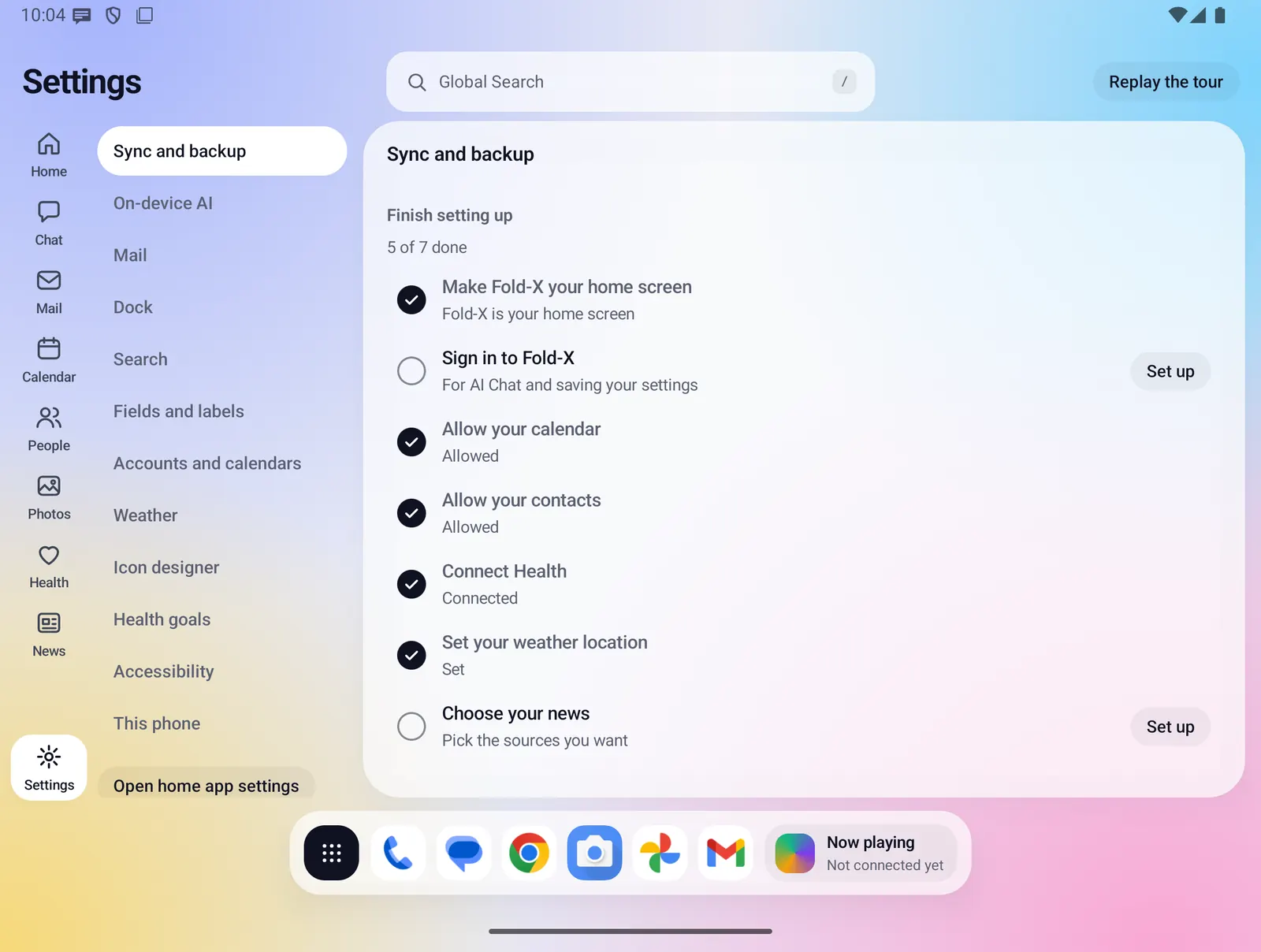
A short tour and a "Finish setting up" checklist get Fold X ready in a few taps. Settings keeps every choice in one place, with a list of sections on the left and the chosen section beside it. When you are signed in, most settings are saved to your Fold X account and come back on a new phone.
- Where you find it
- Open screen: section list beside the chosen section. Closed screen: the section list, then one section per screen.
- How it works
- On your phone. Settings sync to your Fold X account goes through the Fold X server when you are signed in.
- What you need
- Nothing extra to change settings. Each checklist row asks for its own permission only when you tap it. Saving settings to your account needs you to be signed in.
- Your data
- Settings are saved to your Fold X account when signed in. Passwords, health readings, mail, contacts, calendar and tasks are never part of it.
Finish setting up
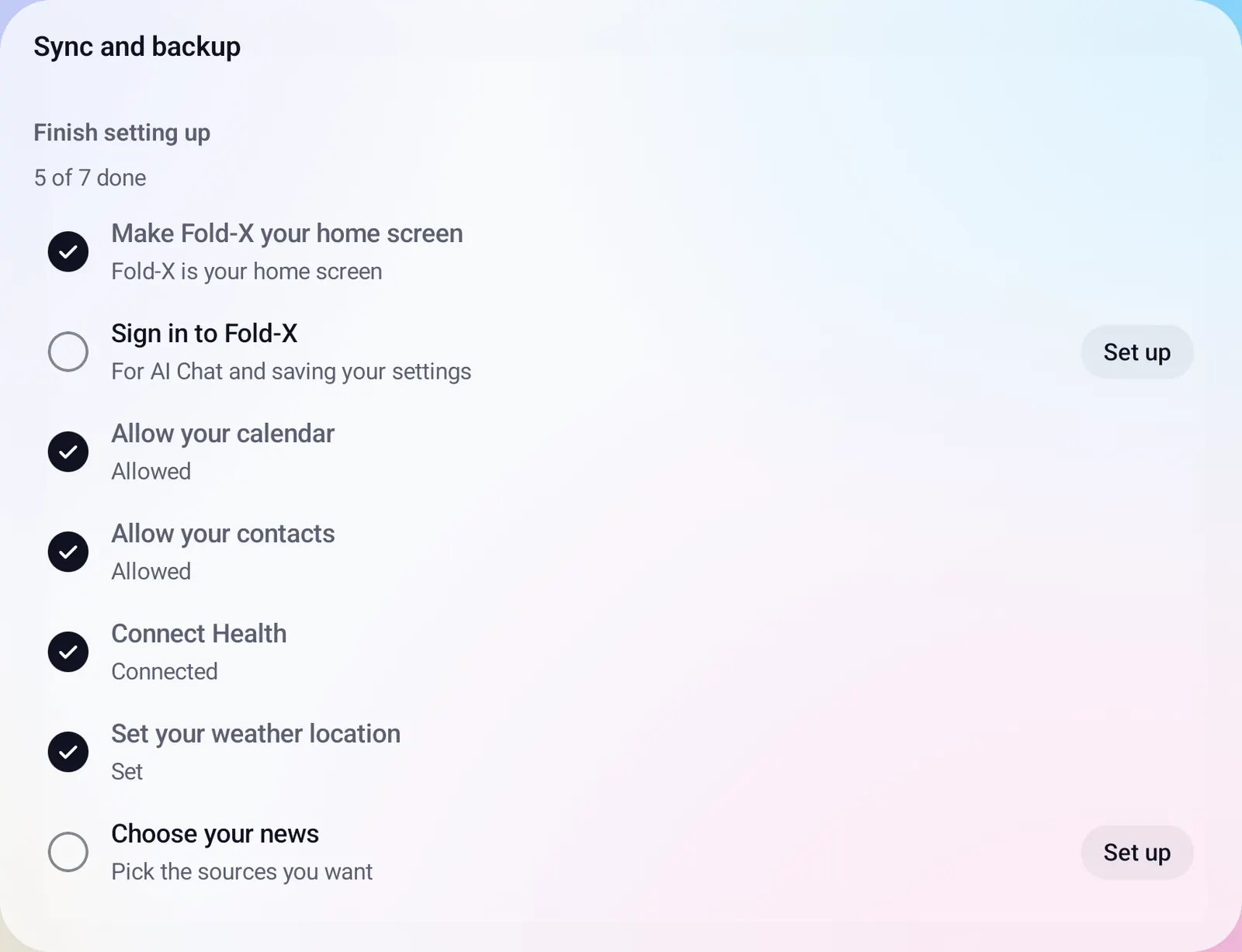
A checklist of what Fold X needs, with one tap per row. A row is ticked only when your phone says it is done, so the list is always current.
- Make Fold X Launcher your home screen. One tap asks Android to make Fold X the home app. If Android cannot ask, its Default home app screen opens.
- Sign in to Fold X. This row shows only if you were signed out.
- Connect Google for Gmail and Tasks. Shows only on a plan with sync. You approve it on Google's own page.
- Allow your calendar, Allow your contacts, Connect Health, Set your weather location and Choose your news.
- Progress reads like "5 of 7 done", and the section says "All set" when nothing is left.
- If you refuse a calendar or contacts request, a short message says to tap the row again. Once Android stops asking, Fold X opens its page in Android settings instead.
Sync and backup
One section that says where each kind of data lives and how it is kept in step.
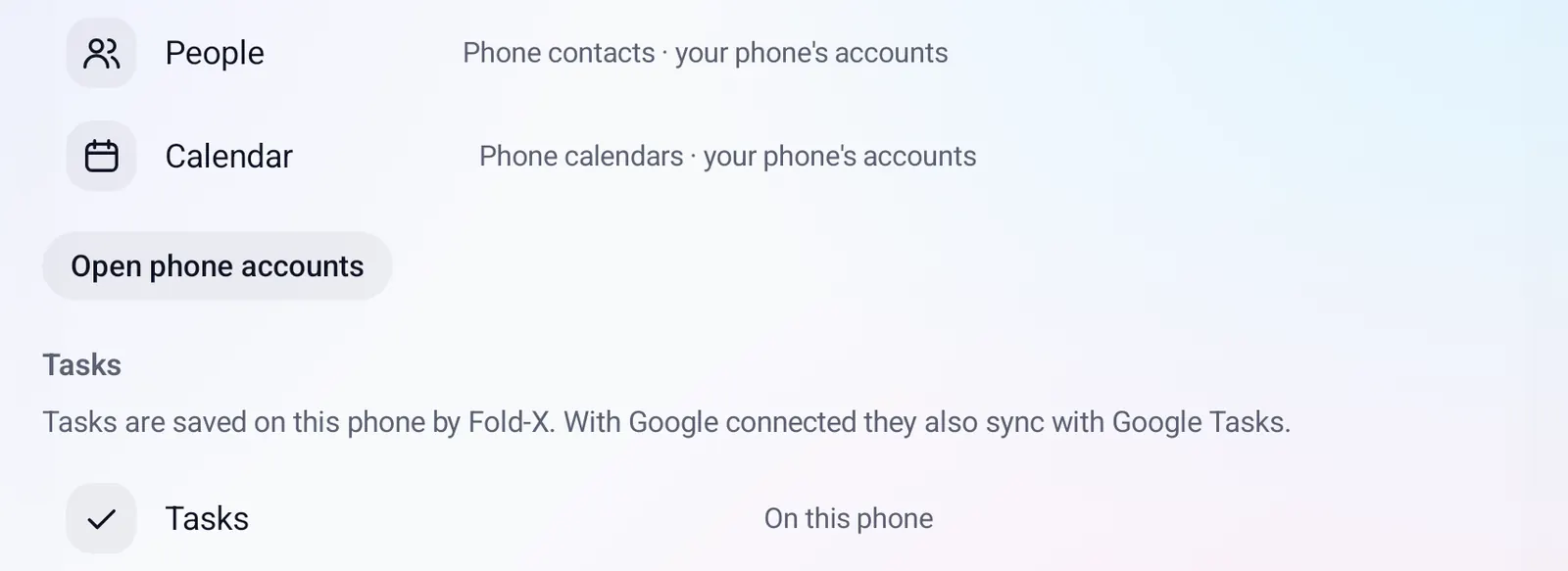
- People and Calendar use the contacts and calendars on your phone. The Google and Microsoft accounts in your phone's settings keep them in sync. Open phone accounts takes you there.
- Tasks are saved on the phone by Fold X. With Google connected they also sync with Google Tasks. The row says "Synced with Google Tasks", "On this phone", or offers Reconnect when the Tasks permission is missing.
- Your Fold X account, with a status line for settings sync.
- Google Drive and OneDrive: connect or disconnect each one for People files. Fold X sees only the files it puts there.
- Google device backup: Fold X is included in your phone's own Google backup.
- Fold X Cloud backup with its own switches and restore. See Cloud backup and restore.
Everything Settings and setup does
First run and the tour
- First run goes: create your Fold X account or sign in, an offer to turn on two-step sign-in, choose a plan or start the free trial, then the tour.
- The tour has three cards on the open screen: "Welcome to Fold X Launcher", "Getting around" (it points out the rail of windows) and "Now close the phone".
- The last card offers Make Fold X Launcher my home screen or Not now. Either one ends the tour and opens the checklist.
- Replay the tour at the top of Settings runs it again.
- A small "Finish setting up" box on Home shows your progress. Tapping it opens the checklist in Settings. You can close the box; the checklist stays in Settings.
Welcome back on a new phone
- When you sign in on a new or reset phone, your saved settings come down from your account.
- A "Welcome back" screen then lists only what this phone must allow again: home app, Google, calendar, contacts and Health. Weather and news come back with your account.
- Hidden calendars and the calendar new events go to are saved by name, so they match up on the new phone.
Sections in Settings
- Sync and backup: the checklist, sync status, your account, Google Drive and OneDrive, device backup and Cloud backup.
- On-device AI: the active model, downloads and updates, and a switch for each source Chat may read. See On-device AI.
- Mail: your signature, added to every email you write, reply to or forward, and your Fold X account.
- Dock: the same apps on both screens, or different apps for the closed and open screens. Tap an app to take it off, or Choose apps to add. A dock widget on the open screen: None, Now playing, Up next, Focus timer, Battery or Steps.
- Search: one tile per Global Search source (Apps, People, Mail, Calendar, Files, Phone settings). Turn any of them off.
- Fields and labels: your own labels and fields for People, Google Contacts labels, and which field types show.
- Accounts and calendars: a check mark for each contacts account and each calendar, grouped by account with its color, and the calendar new events are saved to. The menu line says what is off, such as "Everything on".
- Weather: Use my location (asks for rough location only when you tap it) or a five-digit ZIP code. Each replaces the other.
- Icon designer: restyle every app icon Fold X draws. Presets (Original, Tonal, Vivid, Glass, Outline, Mono, Dark), shape, background, color, symbol, icon size, border, shadow, and app names on or off.
- Health goals: steps a day (1,000 to 50,000), active calories a day (50 to 5,000) and hours of sleep (4 to 12). A goal is saved when the number is in range.
- Accessibility: see below.
- This phone: which phone Fold X detected, its model, whether it folds, the layout in use, and the window and screen sizes. Read only. See Devices and layouts.
- Open home app settings under the list opens Android's Default home app screen.
Accessibility
- Text size: follow your phone's size, or pick a size just for Fold X from 85% to 200%, with a preview. Screens scroll when text no longer fits.
- Larger touch targets: every button and switch takes at least 48dp.
- High contrast: darker text and lines, solid white panels and a plain background. It turns on by itself when high contrast text is on in your phone's settings.
- Reduce motion: screens change at once, with no sliding, fading or moving parts. Fold X also follows "Remove animations" in your phone's settings.
- Each choice applies at once, with no restart. All four are saved to your account.
Your Fold X account
- Shows who you are signed in as, your plan or "Free trial, N days left", settings sync status and two-step sign-in status.
- Subscribe or Change plan, Manage subscription in Google Play, Restore purchase.
- Security: passkey, authenticator app and password.
- Connect or disconnect Google for Gmail and Tasks, when your plan includes sync. Disconnecting deletes the kept mail at once and leaves your tasks on the phone.
- Privacy policy, Sign out, and Delete account. The delete dialog reminds you to cancel Google Play billing separately. See Delete your account.
Settings saved to your account
- Saved: signature, dock apps and dock widget, search sources, ZIP code, hidden accounts and calendars (by name), accessibility choices, app categories and moves, the icon design, news sources and health goals.
- A change is sent a few seconds after you make it. Fold X checks again when it starts, each time you come back to it, and right after sign-in.
- A newer change on your phone is never overwritten by an older copy.
- Sync never asks, blocks or shows an error. Its status is one quiet line, such as "Saved" with the time it was checked.
Limits and what is not built yet
- There is no dark app theme yet.
- The phone's bold text setting is not applied to Fold X's own text.
- With larger touch targets on, week and month calendar cells, event blocks and People favorite tiles still cannot grow to 48dp.
- Global Search has no Calculator tile in Settings, even though search does quick sums.
- Your rough location and the setup box's closed state stay on this phone and are not saved to your account.
Privacy
Changing a setting does not send anything. When you are signed in, the settings listed above are saved to your Fold X account so they come back on a new phone. Passwords, health readings, mail, contacts, calendar, tasks, chats and your rough location are never part of it. Each checklist row asks for its permission only when you tap it, and you can refuse. See Data & permissions.