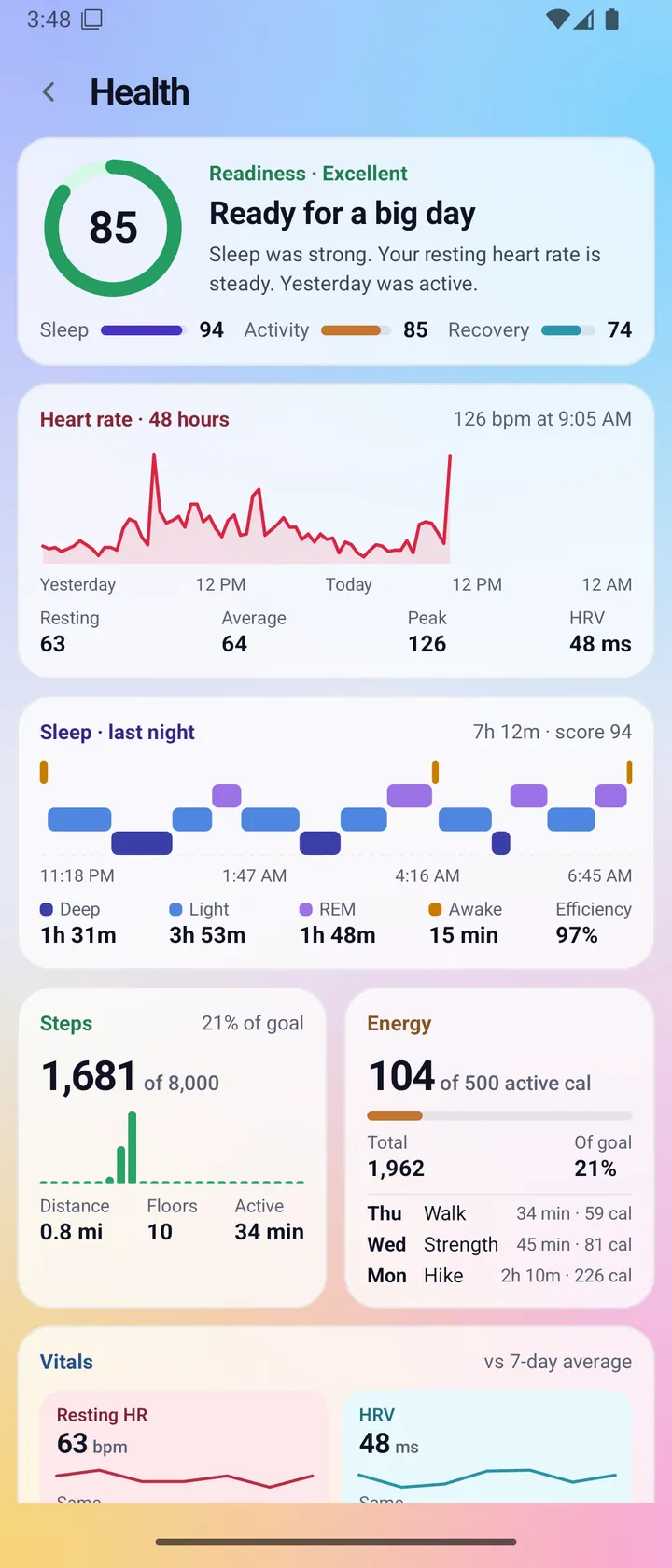
Features / Health
Health
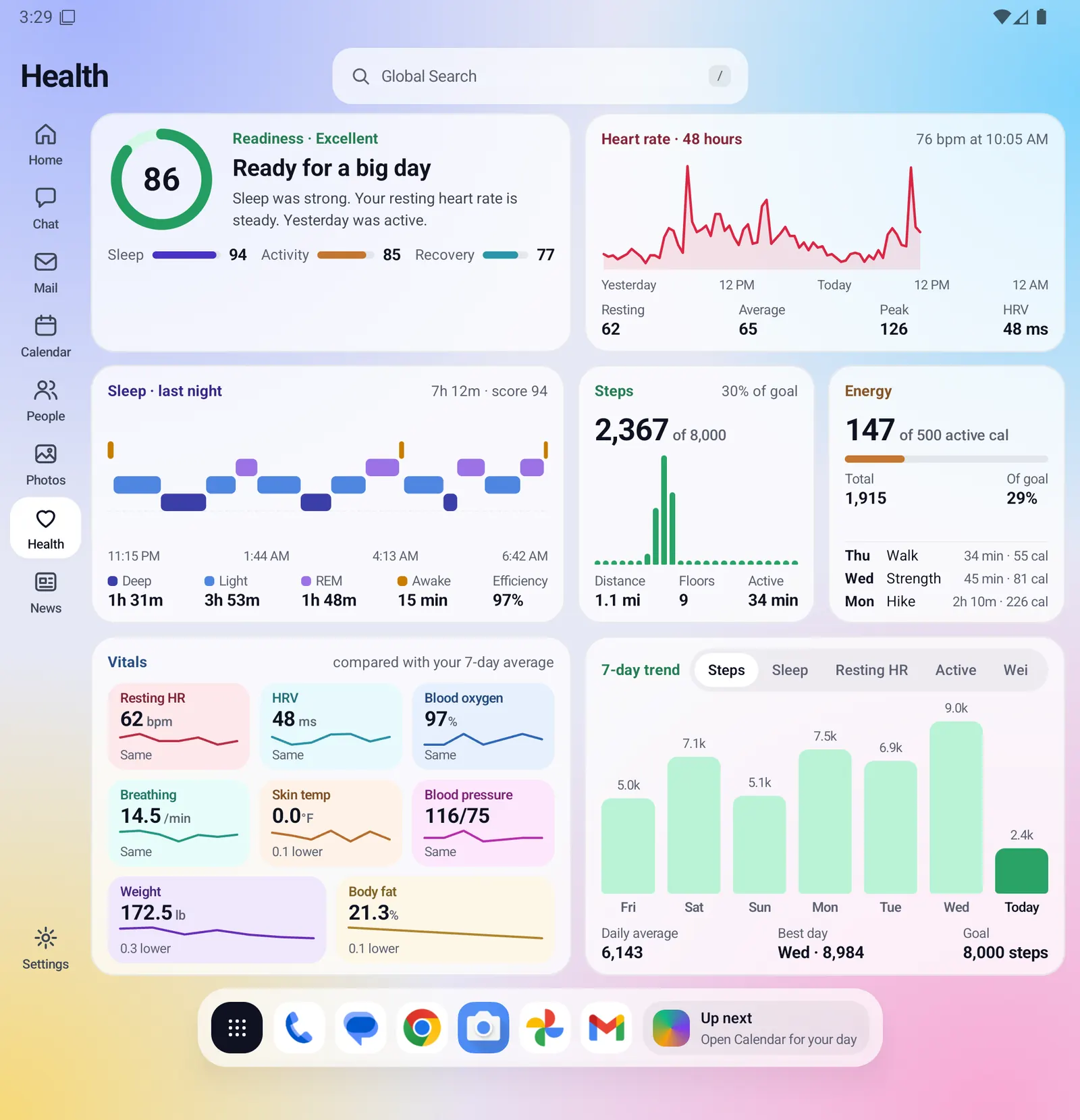
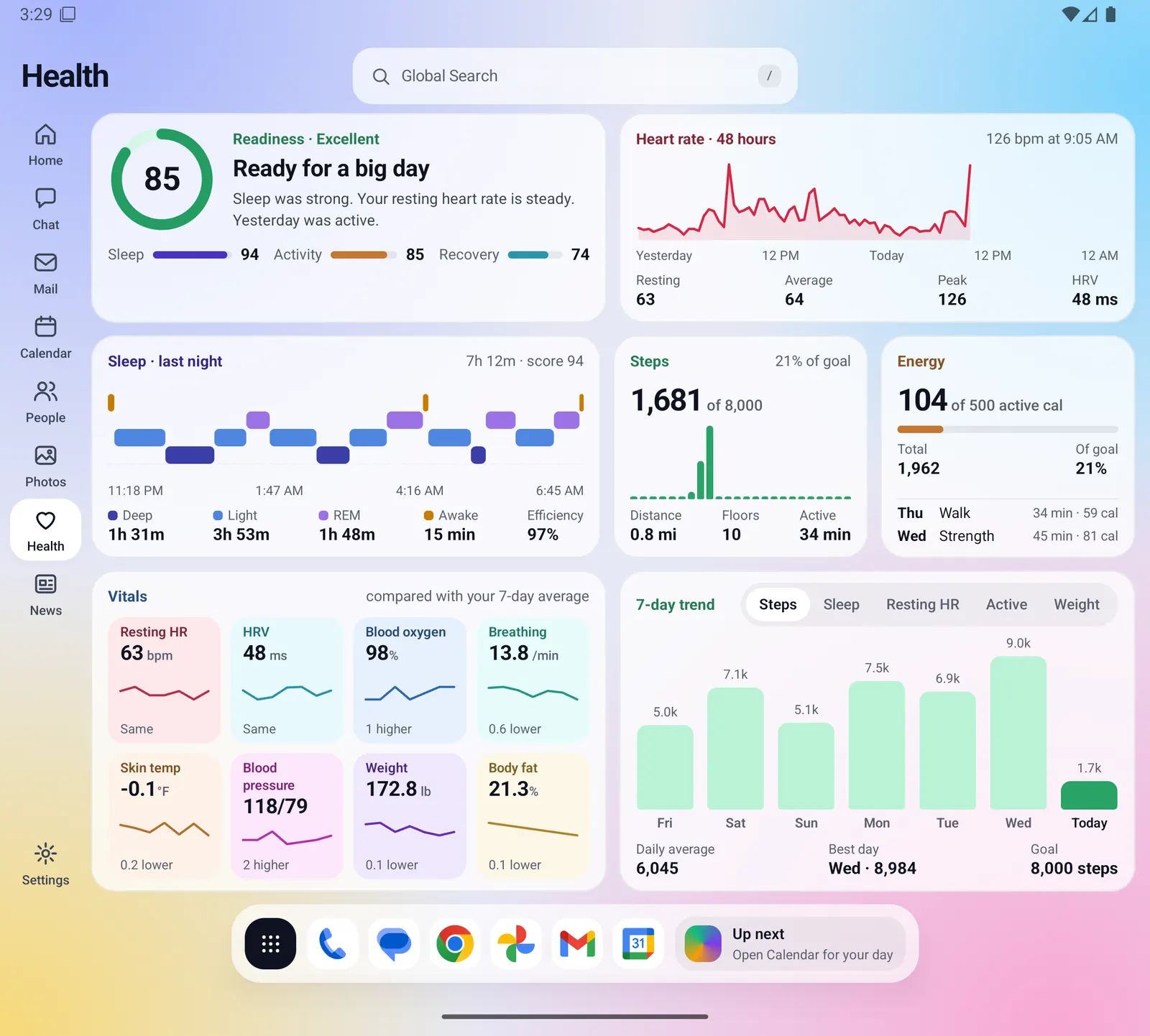
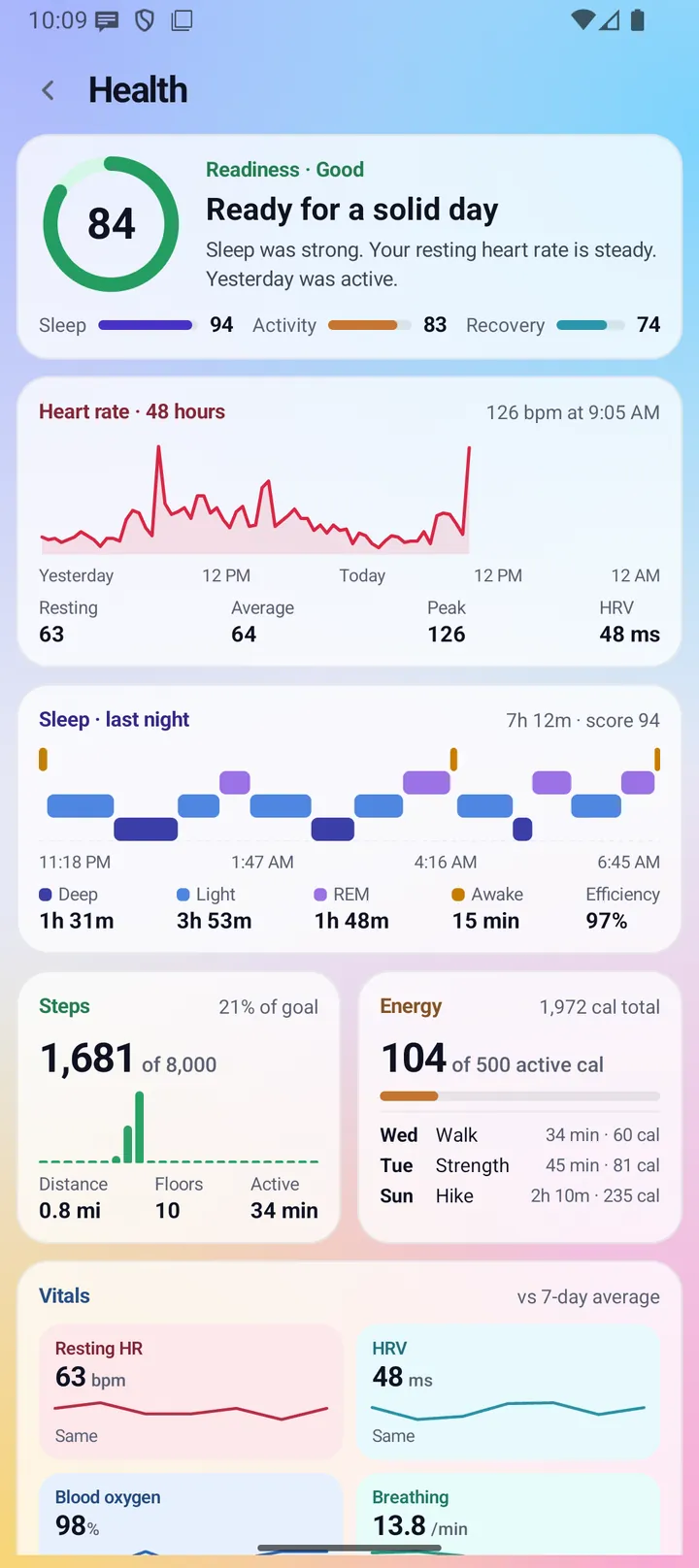
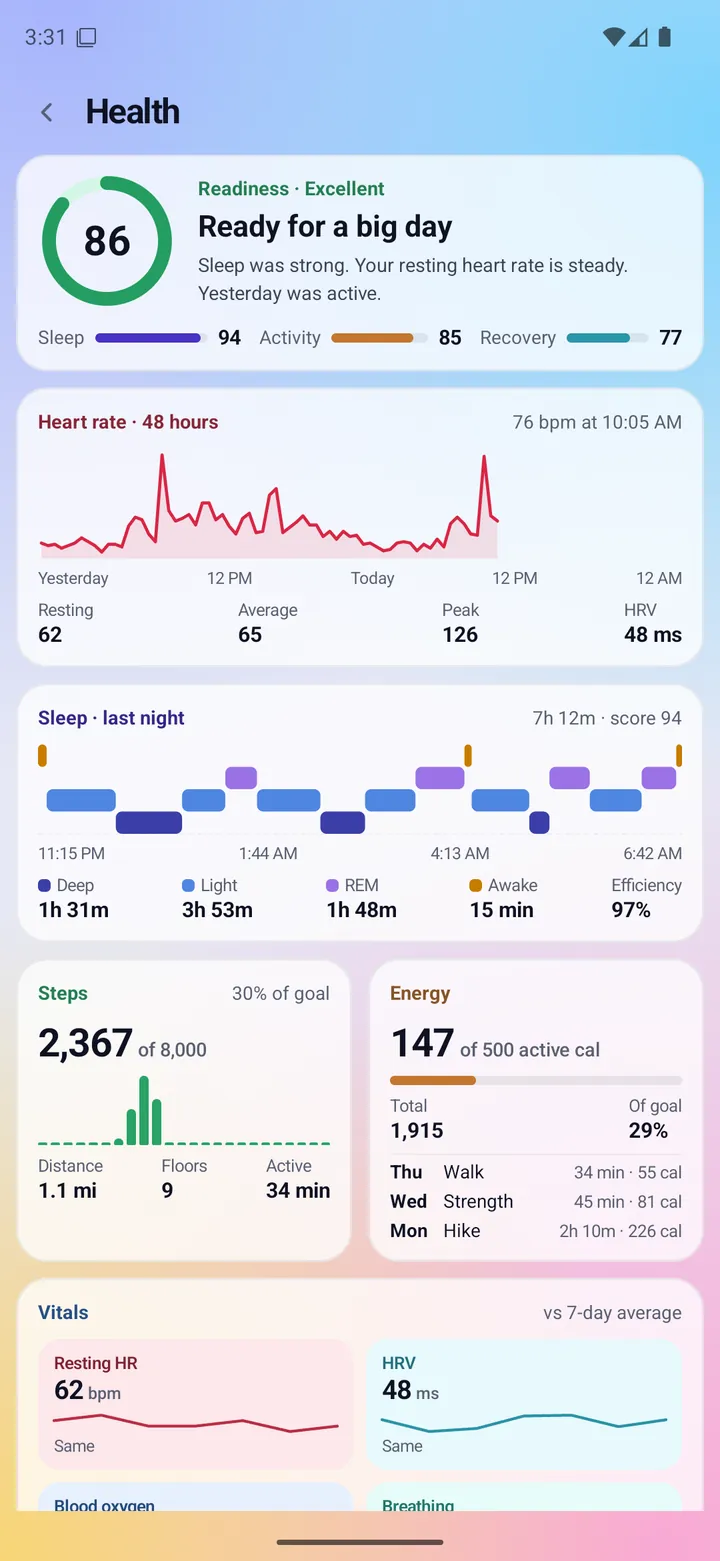
One dashboard of your own health numbers: readiness, heart rate, sleep, steps, energy, vitals and a 7-day trend. Fold X reads them from Health Connect on your phone and works out the scores there. It states facts only. It does not give medical advice and is not a medical device.
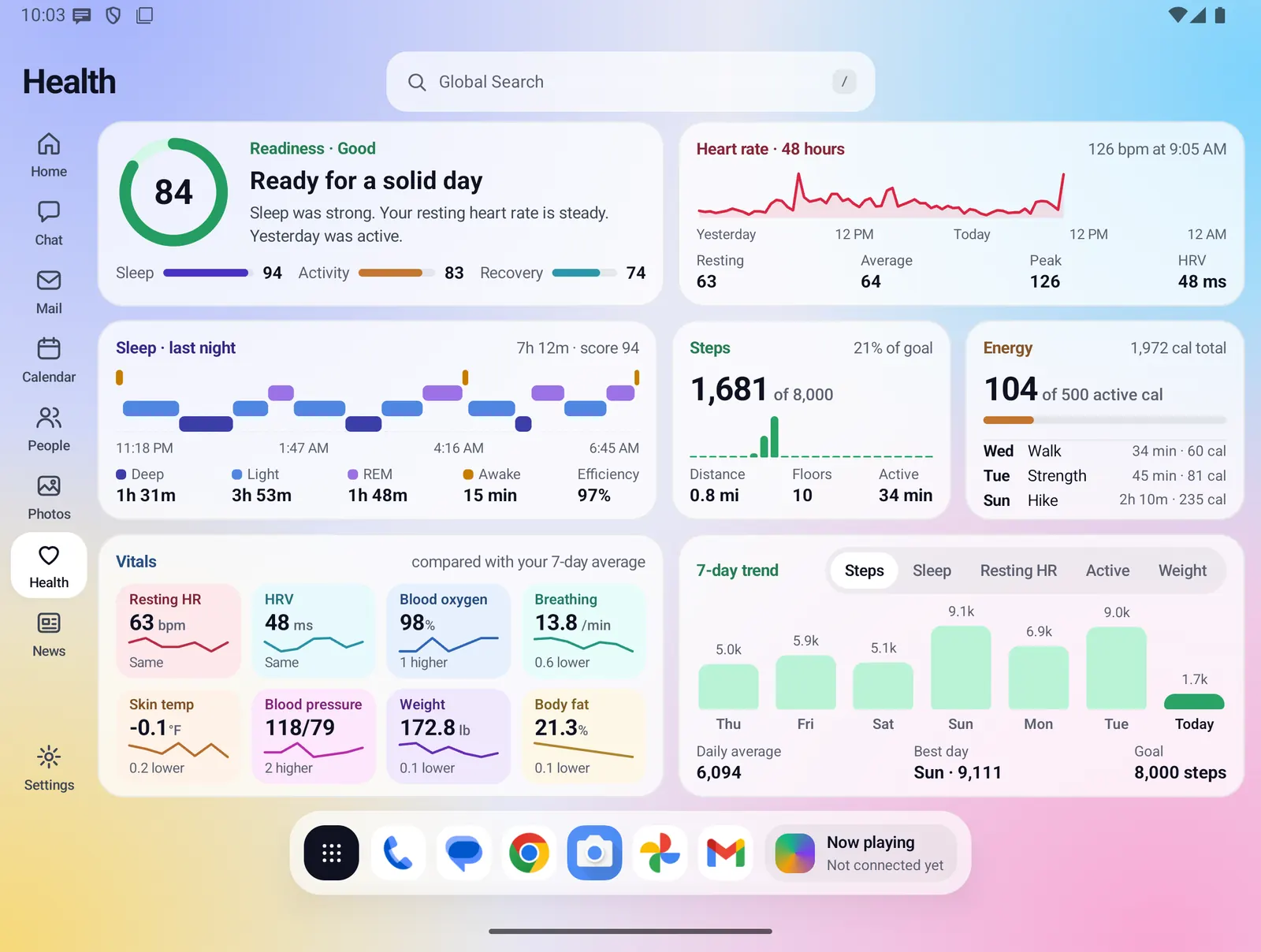
- Where you find it
- A window on the open screen, and a scrolling page on the closed screen
- How it works
- On your phone. Read only: Fold X never writes to or deletes from Health Connect
- What you need
- Health Connect, and your permission for each kind of reading you want to see
- Your data
- Readings stay on the phone and in memory only, unless you switch on the optional Health readings backup
Readiness
A score from 0 to 100 in a ring, a one-line verdict, and the three scores it is built from: Sleep, Activity and Recovery.
- Readiness weighs Sleep at 40%, Recovery at 35% and Activity at 25%. It needs at least two of the three.
- Bands: 85 and up is Excellent, 70 to 84 Good, 55 to 69 Fair, below 55 Low.
- The verdict only states facts, such as "Sleep was strong. Your resting heart rate is steady." It never tells you what to do.
- The same inputs always give the same score. A score without enough data is hidden.
Heart rate
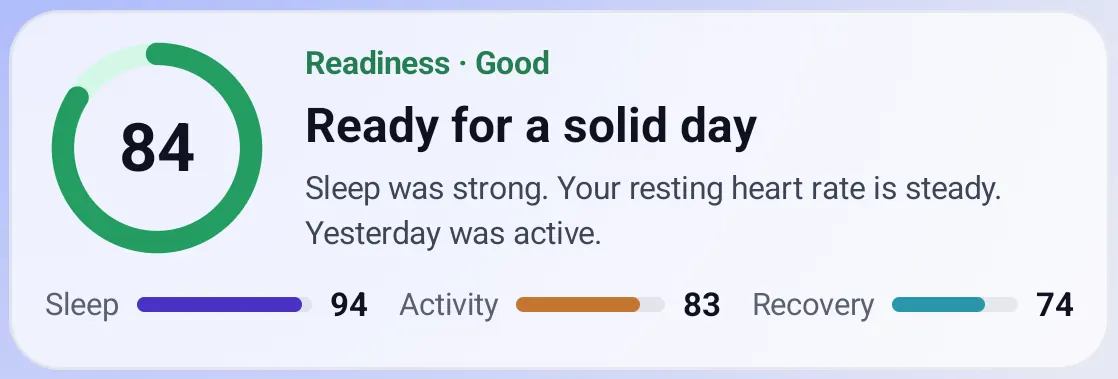
Your heart rate as a line over the last 48 hours, yesterday and today, with the latest reading in the corner.
- Under the line: resting, average, peak and HRV (heart rate variability).
- Readings are averaged per half hour so the line follows your day.
- If no app records a resting heart rate, Fold X estimates it from the lowest half-hour average of the day and labels it "(est.)".
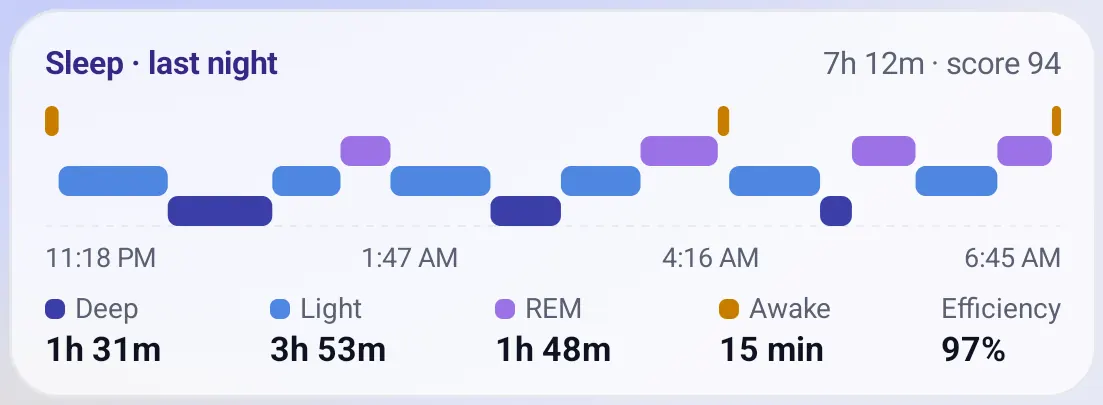
Sleep last night
Your sleep stages through the night, from the time you fell asleep to the time you woke, with the total time asleep and a sleep score.
- Time in deep, light and REM sleep, time awake, and efficiency (time asleep out of time in bed).
- If your tracker does not tell deep and REM sleep apart, the card shows time asleep, plus awake time and efficiency when known, instead of the stages.
- The sleep score is based on time asleep against your sleep goal, efficiency, and the share of deep and REM sleep.
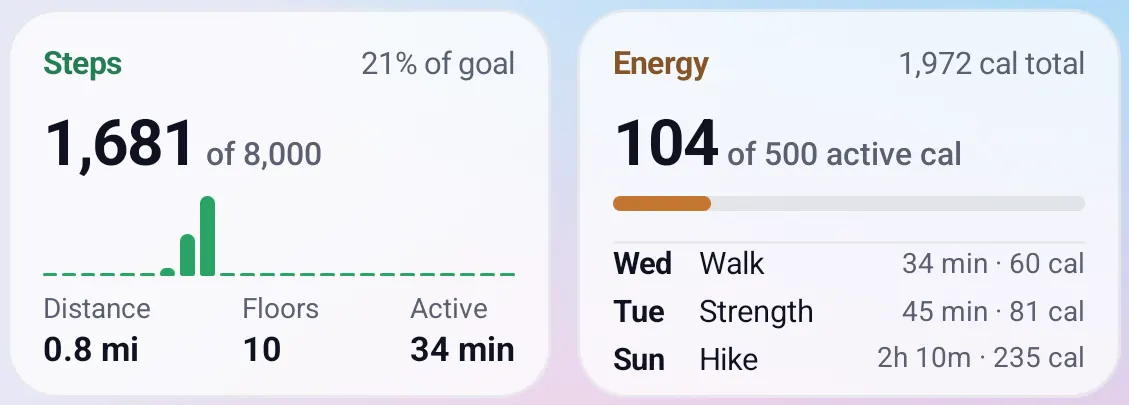
Steps and Energy
Steps shows today's count against your goal, steps by hour, distance, floors and active minutes. Energy shows active calories against your goal, the total burned, and the week's latest workouts.
- Active minutes are the time in recorded workouts.
- The open screen lists up to six workouts, the closed screen three.
- Calories appear only when an app recorded them. Health Connect's own estimate from body size is left out.
- Totals use Health Connect's combined figures, which avoid counting the same steps twice when two apps record them.
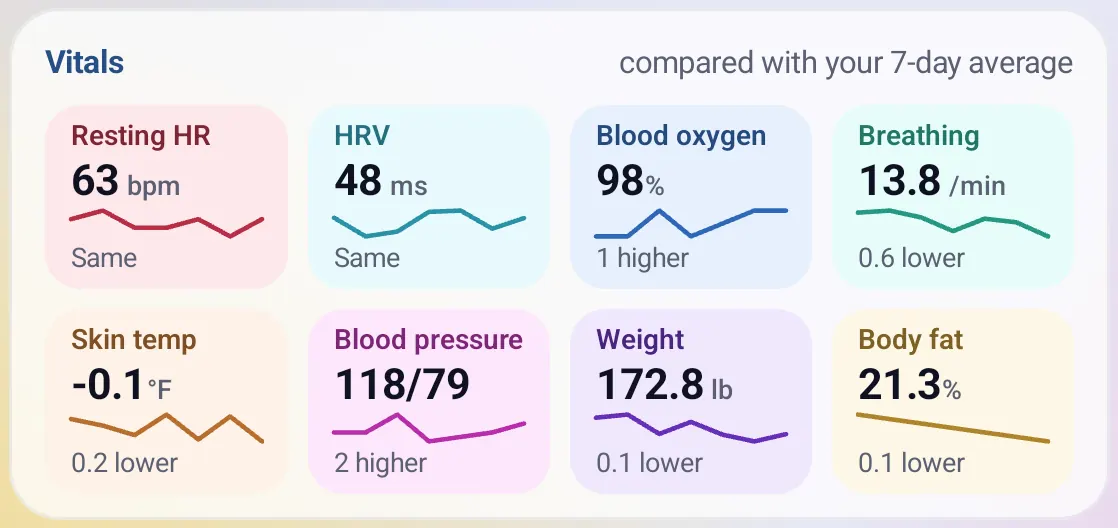
Vitals
Up to eight tiles, each with a small 7-day line and how the latest reading compares with your 7-day average.
- Resting heart rate, HRV, blood oxygen, breathing rate, skin temperature, blood pressure, weight and body fat.
- Each tile says "Same", "higher" or "lower" against your own average. Fold X does not label any reading normal or abnormal.
- A vital with no data has no tile. The tiles share the card's width and wrap to a second row when needed.
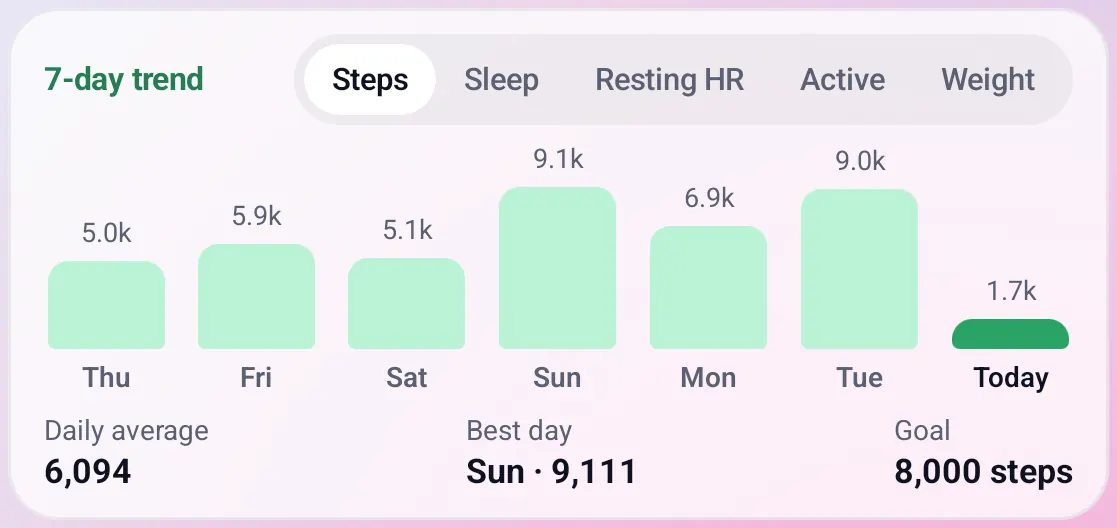
7-day trend
Bars for the last seven days. Tap to switch between Steps, Sleep, Resting HR, Active and Weight.
- Below the bars: the daily average, the best day, and your goal where there is one.
- Today's bar is highlighted.
Everything Health does
Reading your data
- Reads from Health Connect, where Samsung Health, Fitbit, Pixel Watch and most fitness apps write their data.
- Asks for read access to 16 kinds of data: steps, distance, floors climbed, active calories, total calories, workouts, heart rate, resting heart rate, HRV, sleep, blood oxygen, breathing rate, skin temperature, blood pressure, weight and body fat. You choose which to allow. Skin temperature is only asked for where Health Connect supports it.
- Reads today and the seven days before. No history permission is requested.
- Re-reads when you come back to the window and every 5 minutes while it is open. A progress circle shows during the first read.
- Anything with no data is left out, never shown as zero. There is no sample data in the app.
- Units follow your phone's region: miles, pounds and Fahrenheit in the US, metric elsewhere.
- Just after midnight the heart chart still covers yesterday, and Steps and Energy show 0 for the new day instead of disappearing.
Connecting and states
- On a fresh install the window shows Connect Health. Tap it and choose what to allow in Health Connect.
- If you allowed only some kinds of data, Allow more appears in the header.
- If Health Connect is missing or needs an update, the window says so and offers an update button.
- If you allowed access but there is nothing from the last week, the window says which apps add data to Health Connect.
- On a Samsung phone, if Samsung Health is not yet sharing with Health Connect, a note explains this and opens Health Connect so you can turn sharing on. Until then there is often little more than the phone's own step count.
- On a Samsung phone, Open Samsung Health in the header opens that app. On a Pixel or other phone no Samsung wording shows.
- Remove Fold X's access at any time in Health Connect in the phone's Settings. The window then returns to Connect Health.
Samsung Health read directly In development
- On a Samsung phone, Fold X can also read Samsung Health directly to fill gaps Health Connect leaves. Health Connect stays the base; Samsung Health only fills values that are missing.
- When connected, the ring card shows Samsung's Energy Score ("From Samsung Health") in place of Fold X's Readiness, and Samsung's own sleep score in place of Fold X's. Never both.
- A Connect Samsung Health button appears in the header while this is available but not yet allowed.
- Until Samsung approves the app, this only works with Samsung Health's developer mode turned on. Otherwise the window is exactly the Health Connect window, with no message. It has not been checked with real Samsung Health data yet.
Goals
- Three goals in Settings > Health goals: steps a day (default 8,000, from 1,000 to 50,000), active calories a day (default 500, from 50 to 5,000) and hours of sleep (default 8, from 4 to 12).
- Steps, Energy, the sleep score, the Activity score and the trend goal line use them.
- Goals are saved on the phone. When you are signed in, they are saved with your settings to your Fold X account. Goals are settings you typed, not health readings.
Scores, worked out on the phone
- Sleep (0 to 100): time asleep against your sleep goal (60%), efficiency (20%) and the share of deep and REM sleep (20%).
- Activity (0 to 100): how close each of the last seven finished days came to your steps and active calorie goals. Needs at least 3 days with data.
- Recovery (0 to 100): today's resting heart rate and HRV against your average of the earlier days. Needs at least 3 earlier days.
- Readiness: Sleep, Recovery and Activity combined, as described above.
- Other apps' own scores are not shared through Health Connect, so Fold X works out its own.
Open and closed screens
- Open: the seven cards sit in a grid that fills the window. Each chart keeps a minimum height; if they do not all fit, for example with larger text, the window scrolls instead of squashing a chart.
- Closed: the same cards stack in two columns and scroll. Steps and Energy share a row only when neither would be mostly empty.
- Health is in the sidebar between People and News, and has a button on the closed-screen home.
Elsewhere in Fold X
- Home's summary states a few numbers: time asleep, sleep score, steps, and Readiness (or Samsung's Energy Score). It uses the same reads and keeps them in memory only.
- The on-device Chat can read steps, sleep, resting heart rate and weight from the last 8 days when you ask. This runs on your phone and you can turn the Health source off in Settings > On-device AI. Chat's web searches never include anything about your health.
Limits and what is not built yet
- Information only. Fold X does not give medical advice, diagnose anything, or tell you what to do, and it is not a medical device.
- Stress is not shown, because Health Connect has no stress data.
- Only the last 8 days are read. Longer history is not shown.
- The Steps widget in the dock does not read your steps yet.
- Restoring backed-up health readings into Health Connect is not available. They stay in your backup.
- Health Connect on a real Pixel phone, and Samsung Health's real data on the Fold8, have not been fully checked yet.
Privacy
Health readings are read when you open the window and kept in memory only. They are not saved by the window, not written to logs, not used for ads or analytics, and not sent to the Fold X server. The only way they leave your phone is the optional Health readings switch in Cloud backup, which is off until you agree to a one-time question. Then copies of the readings Fold X can read are saved to your private Fold X backup space. Fold X's backup is not end-to-end encrypted. See Cloud backup and restore and Data & permissions.