
Features / Weather
Weather
Weather gives you the forecast for one place: a US ZIP code or your rough location. A chip on Home and a button on the closed screen show the temperature at a glance, and a tap opens the full Weather page with the next 12 hours, 10 days, radar, alerts and details.
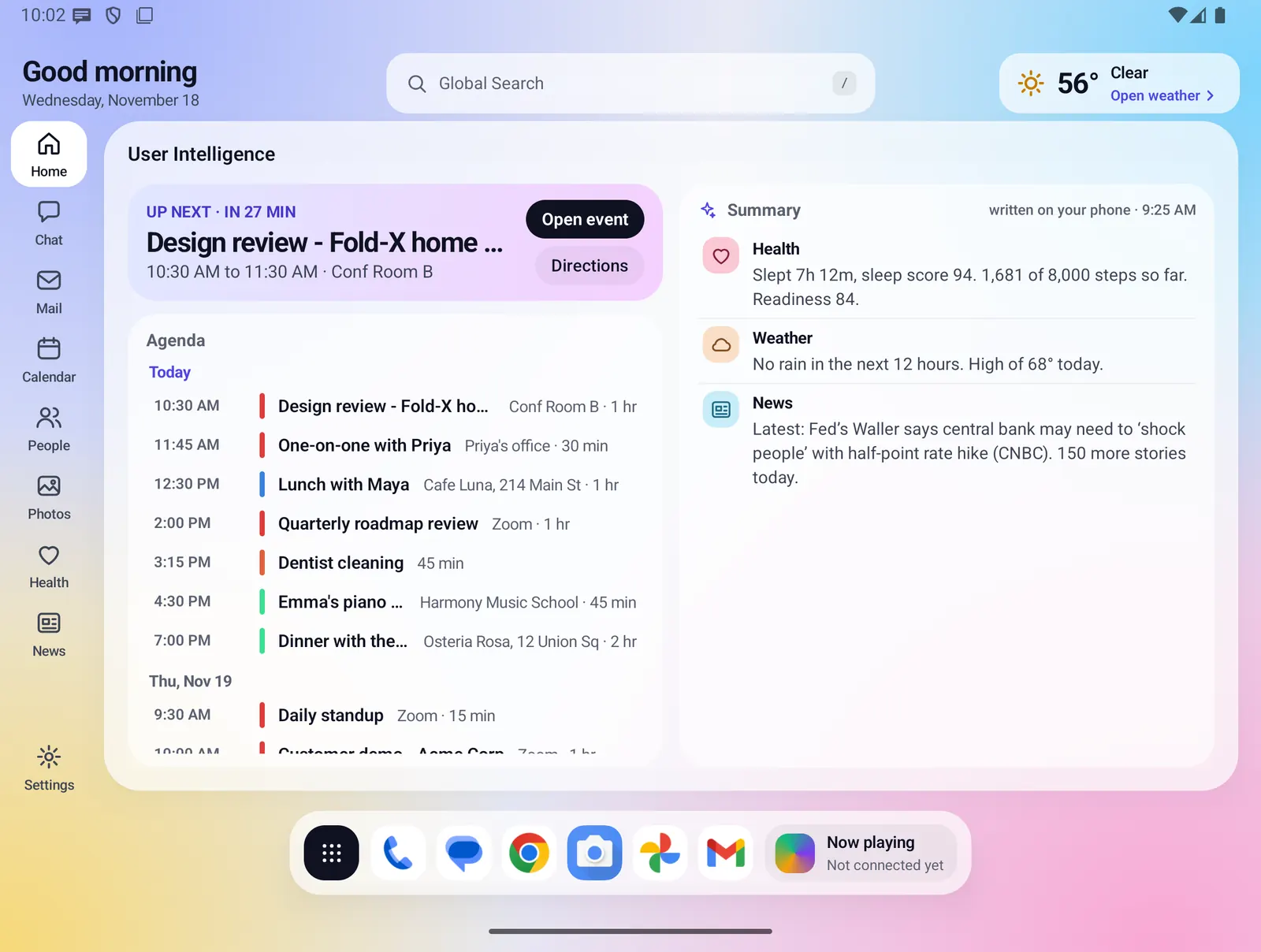
There is no screenshot of the full Weather page yet. The picture above shows where weather appears on Home.
- Where you find it
- Home chip on the open screen, weather button on the closed screen, and the Weather page on both.
- How it works
- On your phone, with forecasts fetched from Open-Meteo and alerts from the US National Weather Service.
- What you need
- A US ZIP code, or rough (approximate) location, asked only when you tap "Use my location". No plan needed.
- Your data
- Your ZIP code or rounded location (about 1 km) goes to the weather services. Nothing that identifies you is sent.
Weather at a glance
You see the weather without opening anything.
- Open screen: the chip at the top right of Home shows an icon, the temperature, the conditions and "Open weather".
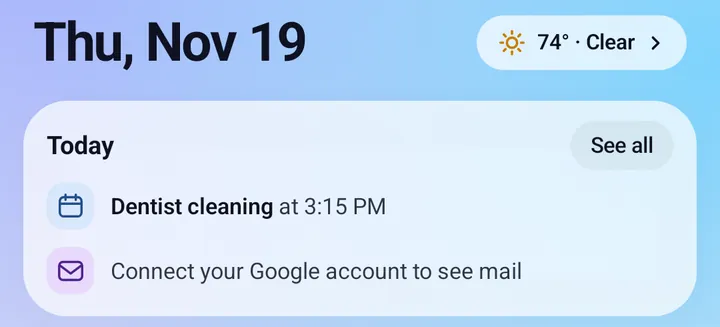
- Closed screen: the button next to the date shows the temperature and conditions, such as "74° · Clear".
- The Home Summary has a one-line Weather paragraph, such as "No rain in the next 12 hours. High of 68° today."
- With no place set, both say "Set your place". A tap takes you to set one.
The Weather page
On the open screen the page fits one screen in two columns: Now above the 10-day list on the left, and the next 12 hours, radar and details on the right. On the closed screen the cards stack in one scrolling column, and the hourly strip scrolls sideways. With large text, the page scrolls. A card with no data is left out and gives its room to the others.
Now
- Weather icon, temperature and conditions, such as "Partly cloudy".
- "Feels like", today's high and today's low.
- The place line: "ZIP 75201 · Dallas, Texas", or the area name when you use your location.
- A short summary line (see below).
- An alert strip when a US weather alert is active, such as a warning "until 6 PM", with "+N more" when there are several.
Alerts
- Tap the alert strip to read each alert in full: the event, headline, description and instructions.
- Alerts come from the US National Weather Service and are labeled that way.
- A saved alert is kept only until it ends.
Next 12 hours
- Up to 12 hours, starting with "Now".
- Each hour shows the time, an icon, the temperature, a rain bar and the chance of rain. A chance of 50% or more is shown in bold blue.
10-day forecast
- Up to 10 days, starting with "Today".
- Each day shows an icon, the low, a low-to-high bar on one shared scale, the high and the chance of rain.
Radar
- A rain radar map centered on your place, with a pin.
- Six pictures, from 50 minutes ago to now. The play button runs them twice and stops on now. With reduced motion turned on, each tap steps one picture.
- The current picture refreshes every 5 minutes while the page is open.
- Radar is shown only for places in and around the lower 48 US states.
Details
- Wind: speed in mph, direction and gusts.
- Humidity: percent and dew point.
- UV index: the number, Low to Extreme, and today's peak.
- Air quality: US AQI number and its band name.
- Pressure: in inches of mercury, and whether it is rising, falling or steady over 3 hours.
- Visibility: in miles, from Clear to Poor.
- Sunrise or sunset: whichever comes next, with the other one under it.
- Moon: percent lit and the phase name, worked out on your phone.
The summary line
- Written on your phone by fixed rules, with no AI.
- If it is raining or snowing, it says when it eases. Otherwise it says when rain moves in, or "No rain in the next 12 hours", and whether rain is likely tomorrow.
- A closing sentence notes strong gusts, heat, a freeze, a big change tomorrow, or today's high or tonight's low.
- If you have already allowed calendar access, it can mention rain around the time of one of today's events. The Weather page never asks for calendar access itself.
Setting your place
- Set it in Settings > Weather, or from the Weather page when no place is set. You can also tap "Change location" on the Weather page.
- ZIP code: type a 5-digit US ZIP code.
- Use my location: Android asks for approximate location only when you tap it. Fold X reads one position, rounds it to about 1 km, names the area using your phone's built-in geocoder, and stops. It never asks for precise or background location.
- Only one place is kept. A ZIP code replaces your location, and your location replaces the ZIP code.
- If location is not allowed, blocked, turned off, or cannot be read, one sentence says which, with "Open Android settings" when it is blocked, and the ZIP code is still offered.
States and messages
- No place: "Set your weather place", with "Use my location" and "Set ZIP code".
- "Loading the forecast…" while it loads.
- Errors, each with "Try again" and "Change location": "ZIP code not found", "No connection", "Enter a 5-digit ZIP code" and "Weather is not available right now".
- When the saved forecast is older than an hour, or a refresh failed, the page shows it with an "Updated" time in the header.
Refresh
- The forecast refreshes when it is more than 30 minutes old, while the weather is on screen (the Home chip counts).
- If air quality or alerts fail, the forecast still shows and the last saved values are kept.
Limits and what is not built yet
- US only: places are set by US ZIP code or location, and alerts come from the US National Weather Service.
- Units are fixed: °F, mph, inches and miles. There is no setting to change them.
- One place at a time. There is no list of saved places.
- Radar covers only the area in and around the lower 48 US states.
Privacy
Fold X sends your ZIP code or rounded location (two decimals, about 1 km) to Open-Meteo for the forecast and air quality, and to the US National Weather Service for alerts. ZIP codes are looked up through Open-Meteo, with Zippopotam.us as a backup. While the Weather page is open, the radar card loads map and radar pictures for the area around your place from the US Geological Survey and the Iowa Environmental Mesonet. Requests carry the name "Fold X launcher" and nothing that identifies you. Your rough location stays on the phone and is not saved to your Fold X account. A ZIP code is saved with your other settings when you are signed in. See Data & permissions.
Weather data by Open-Meteo.com. Alerts by the US National Weather Service. Radar: NOAA/NWS via Iowa Environmental Mesonet. Map: USGS.