
Features / Home
Home
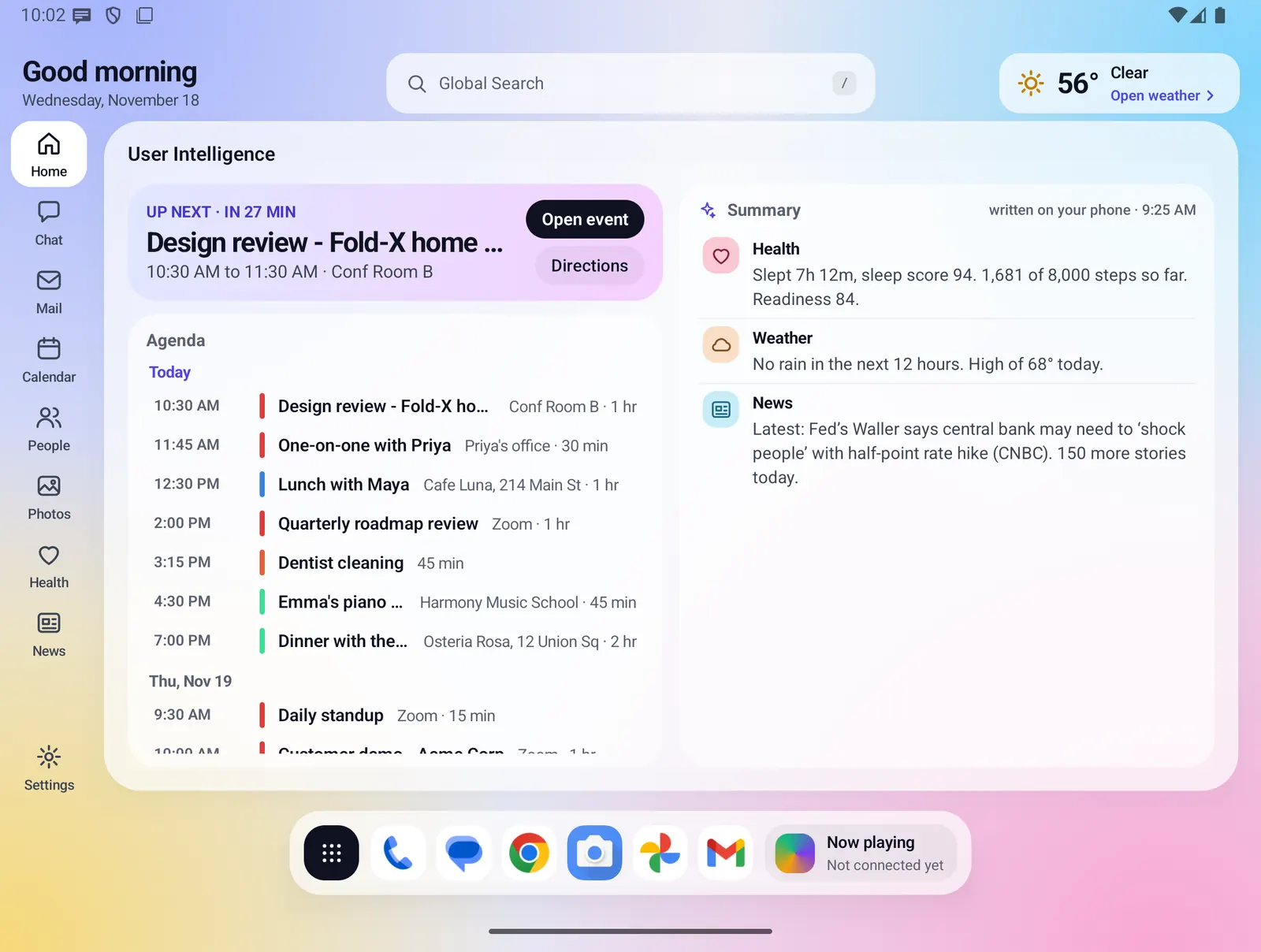
Home is the first thing you see when you unfold the phone. It is called User Intelligence: your next event, your agenda for the week, and a short summary of your mail, health, weather and news. The summary is written on your phone by fixed rules from your own data.
- Where you find it
- Open screen (Home page). The closed screen has a shorter Today card.
- How it works
- On your phone. The summary uses fixed rules, with no AI call and no server call.
- What you need
- Calendar access for the agenda. Each summary line needs its own source: a connected Google account and a plan for mail, Health Connect for health, a weather place, and news sources.
- Your data
- Home itself sends nothing. The written summary stays on the phone and is never saved to your account.
Greeting, search and weather
The top bar runs across the whole screen. On Home it shows a greeting with today's date under it.
- The greeting says "Good morning" before noon, "Good afternoon" before 6 PM, and "Good evening" after that.
- The Global Search pill sits in the center. Tap it to search mail, calendar, people, apps, files and phone settings. See Global Search.
- The weather chip on the right shows the temperature, the conditions and "Open weather". Tap it to open the full Weather page. With no place set it says "Set your place".
- The rail on the left opens Home, Chat, Mail, Calendar, People, Photos, Health and News, with Settings at the bottom.

Up next and the Agenda
The left half of User Intelligence is your calendar. It reads the calendars already on your phone.
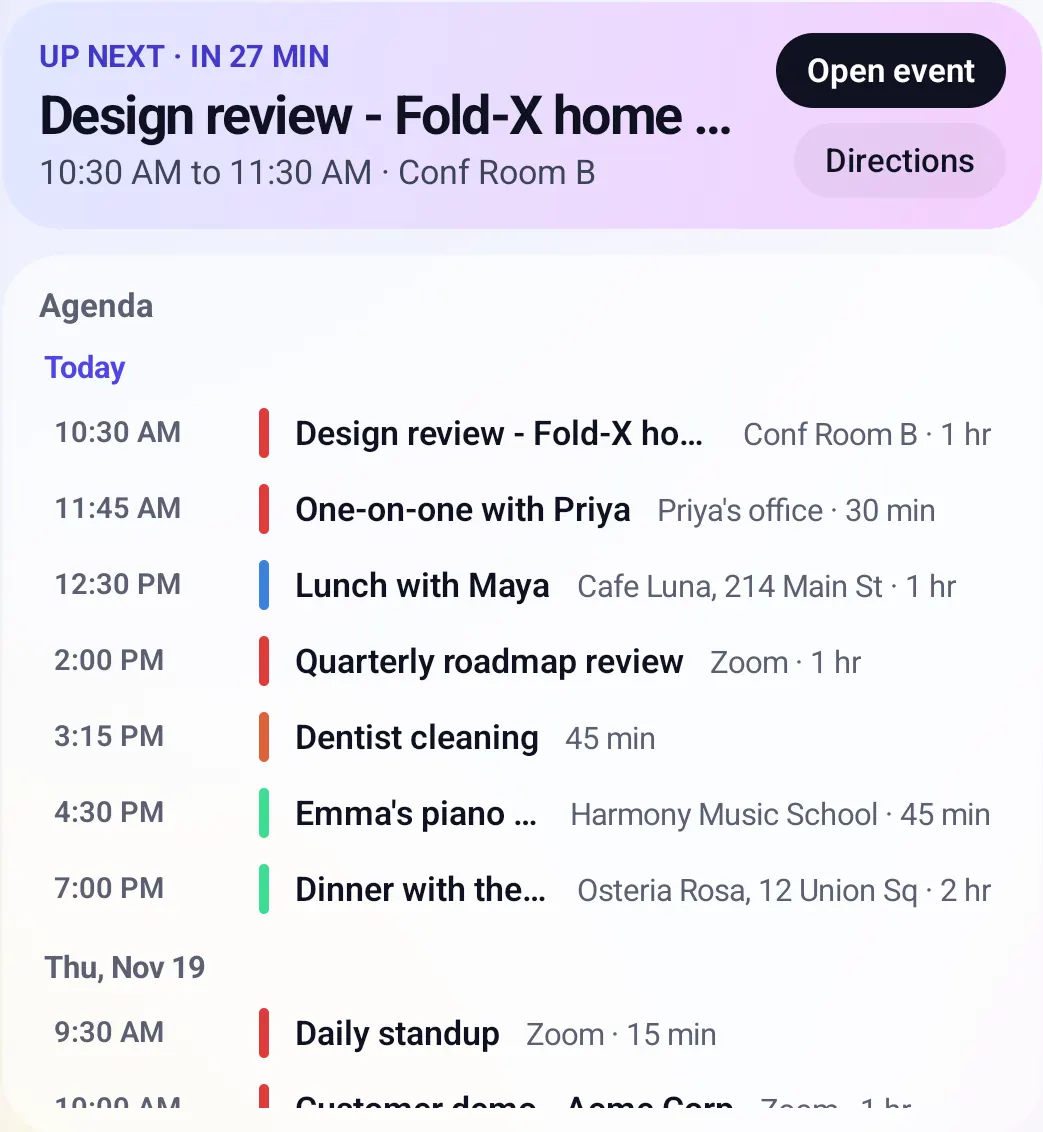
- Up next shows your next event with a countdown, such as "Up next · in 27 min", or "Happening now" while it runs. It shows the time and the place.
- Open event opens the event in Calendar. Directions opens your maps app, and shows only when the location is a real place, not a meeting link.
- The Agenda lists today and the next seven days, grouped by day. Days with nothing on them are left out, and all-day events come first.
- Each row shows the start time (or "All day" or "Now"), the title, the place and how long it lasts. Tap a row to open that event.
- Without calendar access it says "Allow calendar access in Calendar to see your agenda here." With nothing planned it says "Nothing on your calendar for the next week."
The Summary
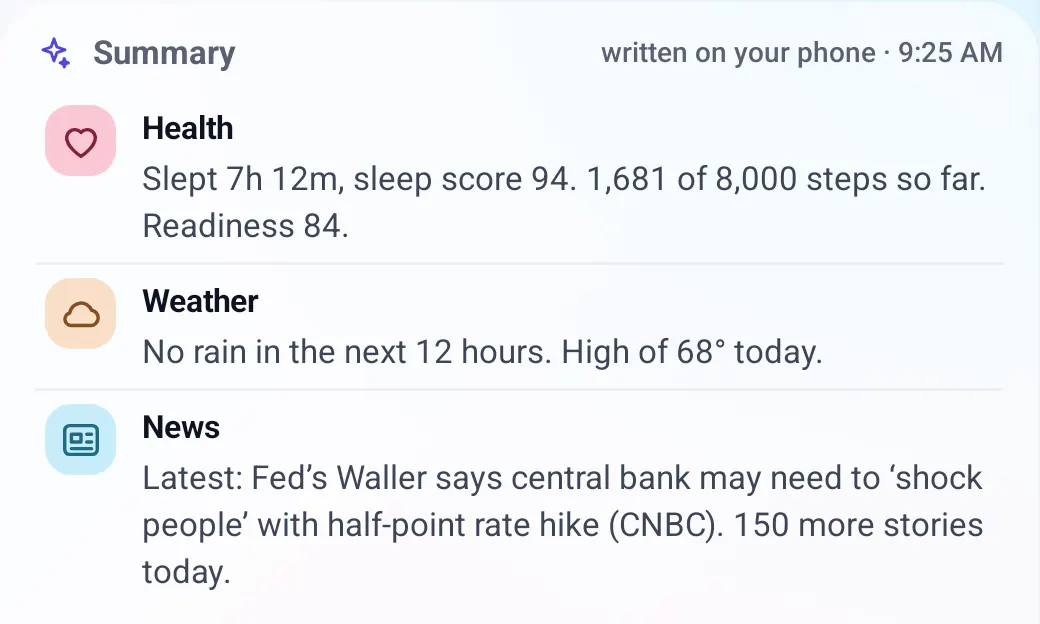
The right half is a short summary, one paragraph per source. Fold X writes it on your phone from your own data, by fixed rules. No AI model and no server is involved.
- Mail: how many unread messages are in your inbox, with up to three senders and subjects.
- Health: last night's sleep and sleep score, steps so far against your goal, and your readiness score.
- Weather: one line from the forecast, such as "No rain in the next 12 hours. High of 68° today."
- News: the latest headline from your chosen sources and how many more stories there are today.
- Calls: missed calls from the last 24 hours. Test builds installed outside Google Play only.
- Tap a paragraph to open its window. An "updated" time shows when the facts were last gathered. They are gathered again when Home opens and every minute while it stays open.
- A source with nothing to say is left out. With nothing at all it says "Nothing to report from mail, calls, health, weather or news right now."
Nicer wording Optional: turn on Nicer wording for the Home summary in Settings > On-device AI, and the AI model that runs on your phone rewrites the Mail, Calls and News paragraphs into one short paragraph. It is off until you turn it on. Details below.
Finish setting up and the tour
On first run a three-card tour shows you around: Welcome to Fold X Launcher, Getting around, and Now close the phone. The last card offers Make Fold X Launcher my home screen.
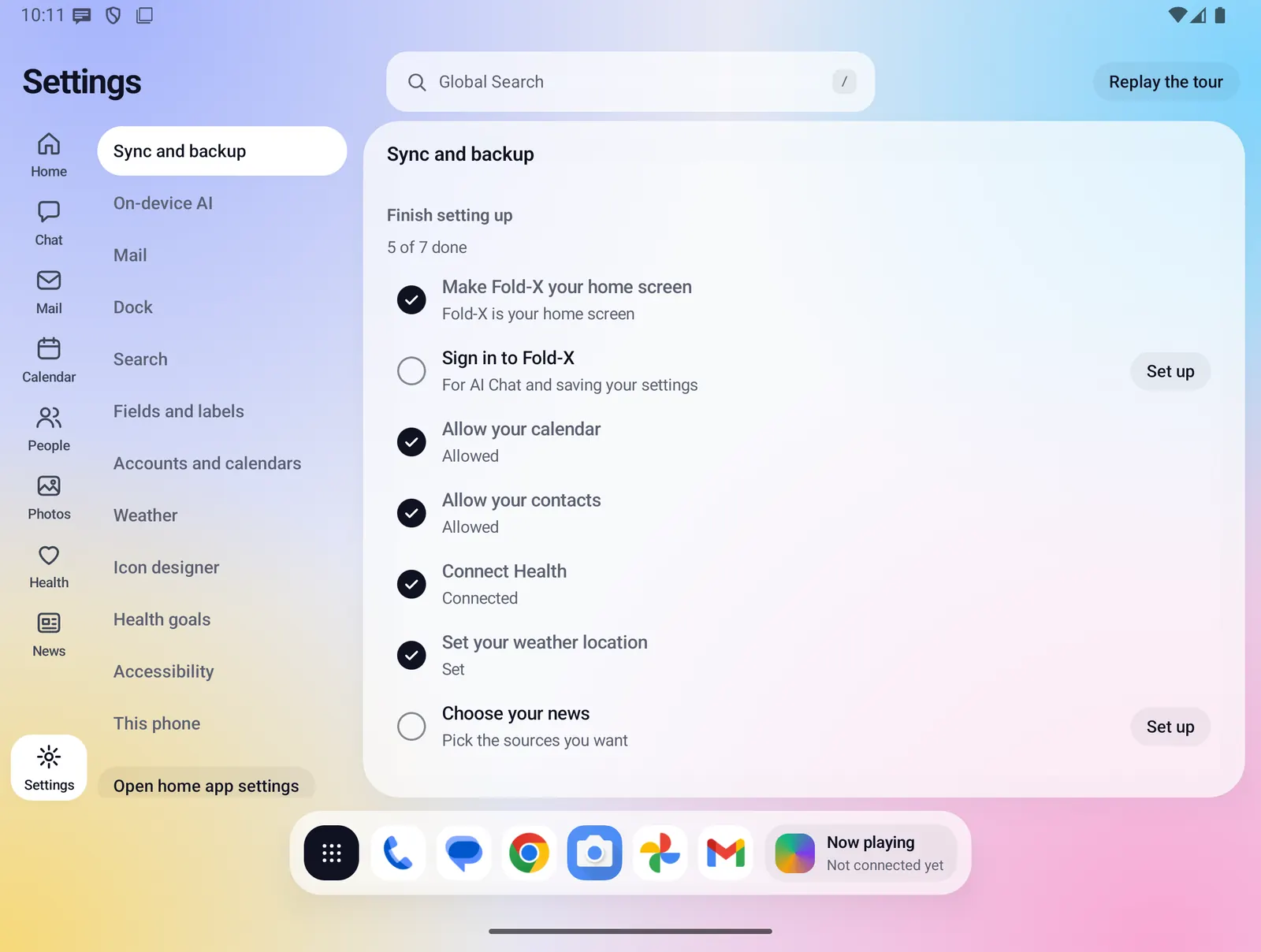
- After the tour, a "Finish setting up" card sits on Home with your progress, such as "3 of 8". Each row is one tap: make Fold X your home screen, sign in, connect Google, allow your calendar, allow your contacts, connect Health, set your weather location and choose your news.
- The card goes away when every row is done or you close it. The same list is in Settings > Sync and backup.
- Replay the tour at any time from the Replay the tour button in Settings.
Today on the closed screen
Closed, Home shows a Today card, the short version of User Intelligence. Its rows show your next event and your unread mail. See all opens the full Today page with the same Up next, Agenda and Summary, stacked in one column.
- A missed-calls row is shown in test builds installed outside Google Play only.
- More on the Closed screen page.
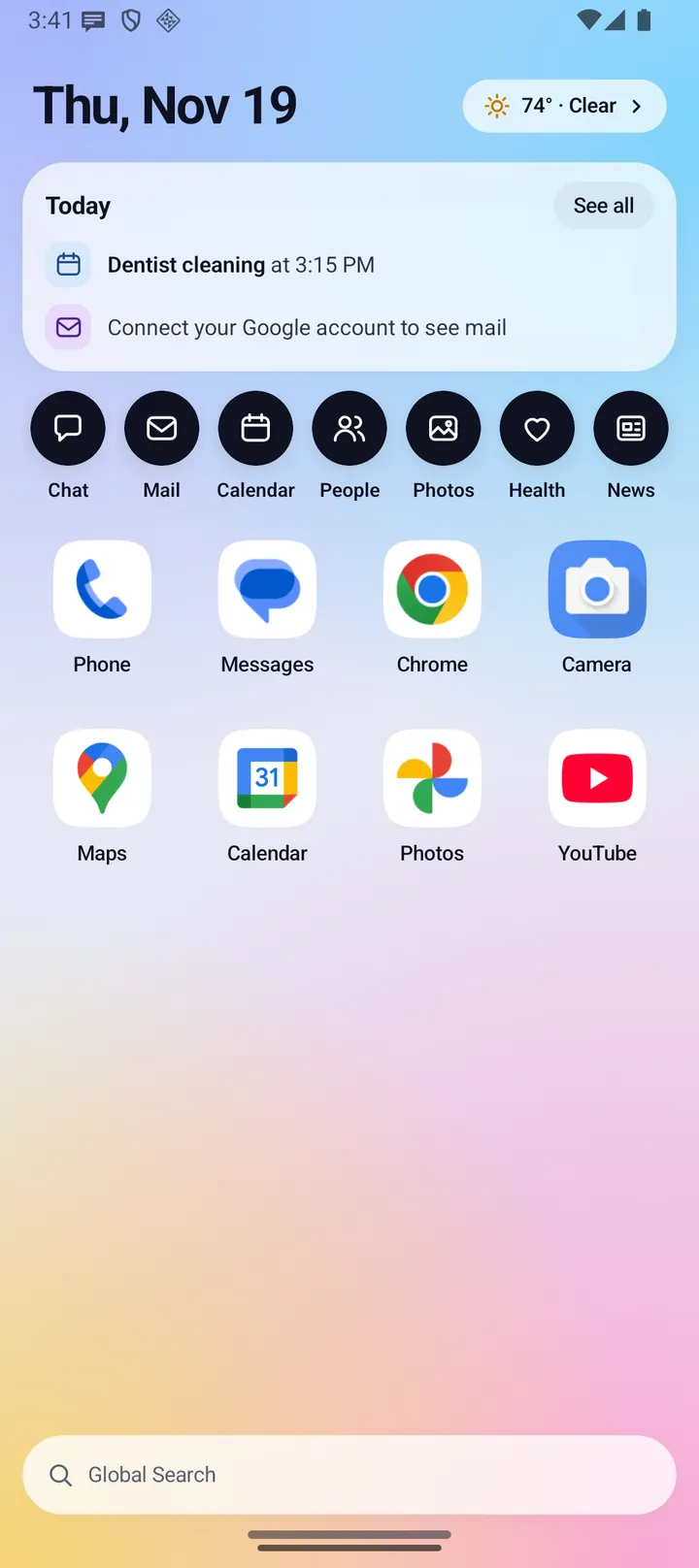
Everything Home does
Top bar and rail
- Greeting by time of day, with the full date under it.
- Global Search pill in the center of the top bar on every page.
- Weather chip: icon, temperature, conditions and "Open weather". "Set your place" when no place is set, "Loading…" while it loads.
- Rail: Home, Chat, Mail, Calendar, People, Photos, Health, News, and Settings pinned at the bottom. The selected page has a white pill.
- The rail gets wider with large text, and its buttons shrink to fit if space runs short.
Up next
- Label: "Happening now", "Up next · in N min", "Up next · in N hr M min" or "Up next".
- Time line: start and end time, with "Tomorrow" or the date for later days, and the place.
- Open event opens Calendar on that event. Directions opens your maps app. If no app can open it, Fold X says so.
Agenda
- Today and the next seven days, from the calendars on your phone.
- Grouped by day ("Today", then dates like "Thu, Nov 19"). Empty days are skipped.
- All-day events first. Each row shows time, title, place and length ("45 min") or "until" a time.
- Tap any row to open the event in Calendar.
Summary
- Mail: unread in the inbox only, naming up to three messages, then "And N more."
- Health: sleep time, sleep score (Samsung sleep score on Galaxy phones with Samsung Health), steps against your goal, and readiness or Samsung Energy Score.
- Weather: one sentence from the forecast rules. See Weather.
- News: latest headline with its source, and the number of other stories today.
- Calls (test builds installed outside Google Play only): missed calls in the last 24 hours, with names and times.
- Same facts, same text: the summary only changes when your data changes.
Nicer wording (optional)
- Off by default. Turn it on in Settings > On-device AI > Nicer wording for the Home summary.
- The on-device model rewrites the Mail, Calls and News paragraphs as one "Mail, calls and news" paragraph of two or three sentences. Health and Weather keep the plain rule text.
- The rule text shows at once. The rewrite fades in when it is ready, and is kept so reopening Home does not ask again.
- Fold X checks the rewrite. If it contains a number, time, name or day that is not in your facts, it is thrown away and the rule text stays.
- It runs only while Home is on screen, never in battery saver, and gives up after 20 seconds.
- Needs the on-device model to be downloaded and supported on your phone. See On-device AI.
Dock and Apps
- The dock under Home holds the apps button, up to six apps and a small widget. See Dock and Apps.
- Swipe up from the dock area on Home to open the Apps page. Drags that start higher up still scroll the Agenda and the Summary.
Setup
- Three-card first-run tour, with a spotlight on the rail on the second card. Back, Next and Skip.
- "Finish setting up" card with 7 or 8 one-tap rows and a progress count.
Limits and what is not built yet
- Home shows only your real data. With a permission missing, a box explains how to allow it. There is no sample data on a real phone.
- There are no Tasks or Messages rows on Home. Tasks live in Calendar.
- The Calls paragraph and missed-calls row exist only in test builds installed outside Google Play. The Google Play build does not read your call log.
- Free-form Home boards and widgets are not built.
- Nicer wording needs a phone that can run the on-device model.
Privacy
The summary is written on your phone from data already on it. Home makes no AI call and no server call of its own. The written summary is not saved to your Fold X account or included in backups. If you turn on Nicer wording, the rewrite also happens on the phone. Weather, mail and news are fetched by their own windows. See Data & permissions.